
dark-attentiondark-datedark-timedark-contactdark-infodark-play dark-pricedark-venueicon-alert icon-arrow-left icon-arrow-right icon-blockquote icon-bluesky--dark_circle icon-bluesky--dark_square icon-bluesky--outline_circle icon-bluesky--outline_square icon-bluesky icon-cal icon-clock icon-contact UI / Full-Part-Volunteer CopyCreated with Sketch. EPS IconCreated with Sketch. icon-facebook--dark_circle icon-facebook--dark_square icon-facebook--outline_circle icon-facebook--outline_square icon-facebookCreated with Sketch. icon-htm icon-info icon-instagram--dark_circle icon-instagram--dark_square icon-instagram--outline_circle icon-instagram--outline_square icon-instagram icon-linkedin--dark_circle icon-linkedin--dark_squareicon-linkedin--outline_circleicon-linkedin--outline_squareicon-linkedin icon-logo2 icon-mp3 icon-pinterest--dark_circle icon-pinterest--dark_square icon-pinterest--outline_circle icon-pinterest--outline_square icon-pinterestCreated with Sketch. icon-play icon-price icon-spotify--dark_circle icon-spotify--dark_square icon-spotify--outline_circle icon-spotify--outline_square icon-spotify icon-spreadsheet icon-threads--dark_circle icon-threads--dark_square icon-threads--outline_circle icon-threads--outline_square icon-threads icon-tiktok--dark_circle icon-tiktok--dark_square icon-tiktok--outline_circle icon-tiktok--outline_square icon-tiktok icon-twitter--dark_circle icon-twitter--dark_square icon-twitter--outline_circle icon-twitter--outline_square icon-twitterCreated with Sketch. icon-x--dark_circle icon-x--dark_square icon-x--outline_circle icon-x--outline_square icon-x icon-youtube--dark_circle icon-youtube--dark_square icon-youtube--outline_circle icon-youtube--outline_square icon-youtubeCreated with Sketch. FolderCreated with Sketch. icon-zoom light-attentionlight-cal light-clocklight-contactlight-infolight-play light-pricelight-venue

Adding a Cookie Consent Plugin

As privacy regulations continue to evolve, we at Ligature Creative want to help ensure our clients are protected and aligned with current best practices. As part of that effort, we recommend adding a cookie consent banner to your website, particularly if you’re using Google Analytics or Meta (Facebook) Pixel to track visitor behavior. While there are several free WordPress plugins available, our preferred solution is WPConsent.

To implement WPConsent on your site, follow these steps:

  • Log in to your site’s backend and navigate to Plugins > Add Plugin.
  • Search for “WPConsent” (developed by Syed Balkhi), then click Install Now and Activate.
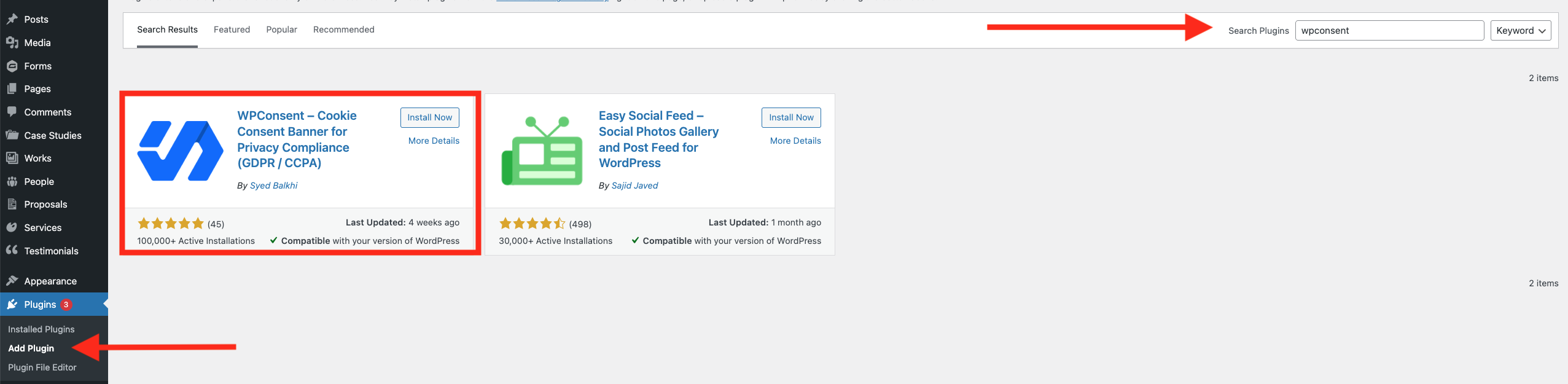
Screenshot of the WordPress plugins page showing search results for "wpconsent," with the WPConsent plugin highlighted for installation.

  • Once activated, the plugin will automatically scan your site to identify services that set cookies. We recommend selecting all flagged services to ensure comprehensive coverage.
  • After configuring your cookie settings, you can customize the appearance of the banner. We suggest using the full-width banner positioned at the bottom of the screen.

Once set up, the banner will appear and remain visible until visitors make a selection (Preferences, Reject, or Accept All), helping support privacy compliance. For accessibility, we recommend styling the banner with black text on a gray background, though colors can be adjusted at any time under WPConsent  > Banner Design > Style.

In addition, WPConsent can generate a Cookie Policy page outlining the cookies used on your site and how long visitor data is stored. This can be configured under WPConsent > Dashboard.
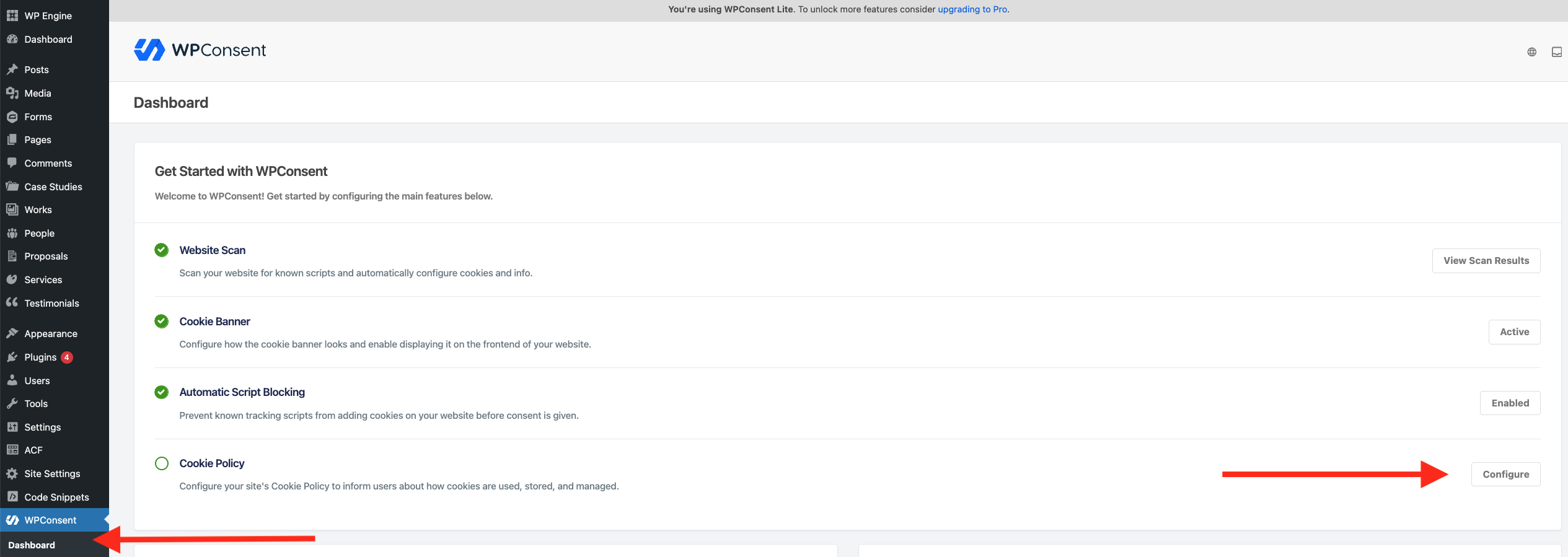
Screenshot of the WPConsent plugin dashboard in WordPress, highlighting the “Cookie Policy” section and the “Configure” button with red arrows.

To hide the “Powered by WPConsent” link on the frontend, go to Banner Design > Content and toggle the switch on.

WordPress admin panel showing the WP Password menu with the "Hide Powered by WP Password" option enabled.